Newcomers Guide to OHDSI
Marina Ainciburu (with contributions from Jeremiah Akintomide & David Akwuru)
Stepping into the OHDSI ecosystem for the first time can feel overwhelming. Many of us in the eHealth Hub have experienced the confusion of navigating through the endless amounts of information and resources on OHDSI.
In the last months, we decided it would be worth sharing some thoughts about our journeys. Hopefully, pointing to some of the resources and creating some order on how to go through them could be helpful for anyone new the OHDSI world.
This post is a beginner-friendly roadmap — not official, but personal and proven practical — to get started in the OHDSI world.
## Start Here: EHDEN Academy
📍 [Explore EHDEN Academy](https://academy.ehden.eu/my/)
The EHDEN Academy offers a range of free, well-structured courses that are the perfect starting point. If you're new, this is where to begin. But not all courses are equally useful right away, so here’s what we recommend based on our experience:
## A conceptual introduction
**Getting Started**
A quick walkthrough of the platform itself. It only takes a few minutes.
**EHDEN Foundation – Module 2: Introduction to Real World Data and Evidence**
This course gives a solid introduction to OHDSI’s purpose and how it connects with real-world data. It includes a short video overview that helps bring it all to life.
*We recommend skipping Module 1 and 3 for now — they go deep into European project specifics, which can be overwhelming early on.*
## Set up your OHDSI environment with OHDSI-in-a-Box
Before you continue to courses with hands-on exercises, you’ll need a working OHDSI environment. OHDSI-in-a-Box is a virtual machine (VM) you can deploy on AWS that includes all the key tools.
🔗 [OHDSI-in-a-Box GitHub](https://github.com/OHDSI/OHDSI-in-a-Box)
We recommend you **set this up before starting the OMOP CDM or ETL courses** You can follow the OHDSI-in-a-box course on EHDEN academy to deploy it.
If you don't have access to an AWS account, you can still go through the next EHDEN academy courses. Just skip the exercises, or try to configure your own local OHDSI environment.
## Go Deeper: OMOP CDM and Standardised Vocabularies
One of the most useful courses for us was this one. It’s the course that really gave structure to what OHDSI is doing under the hood.
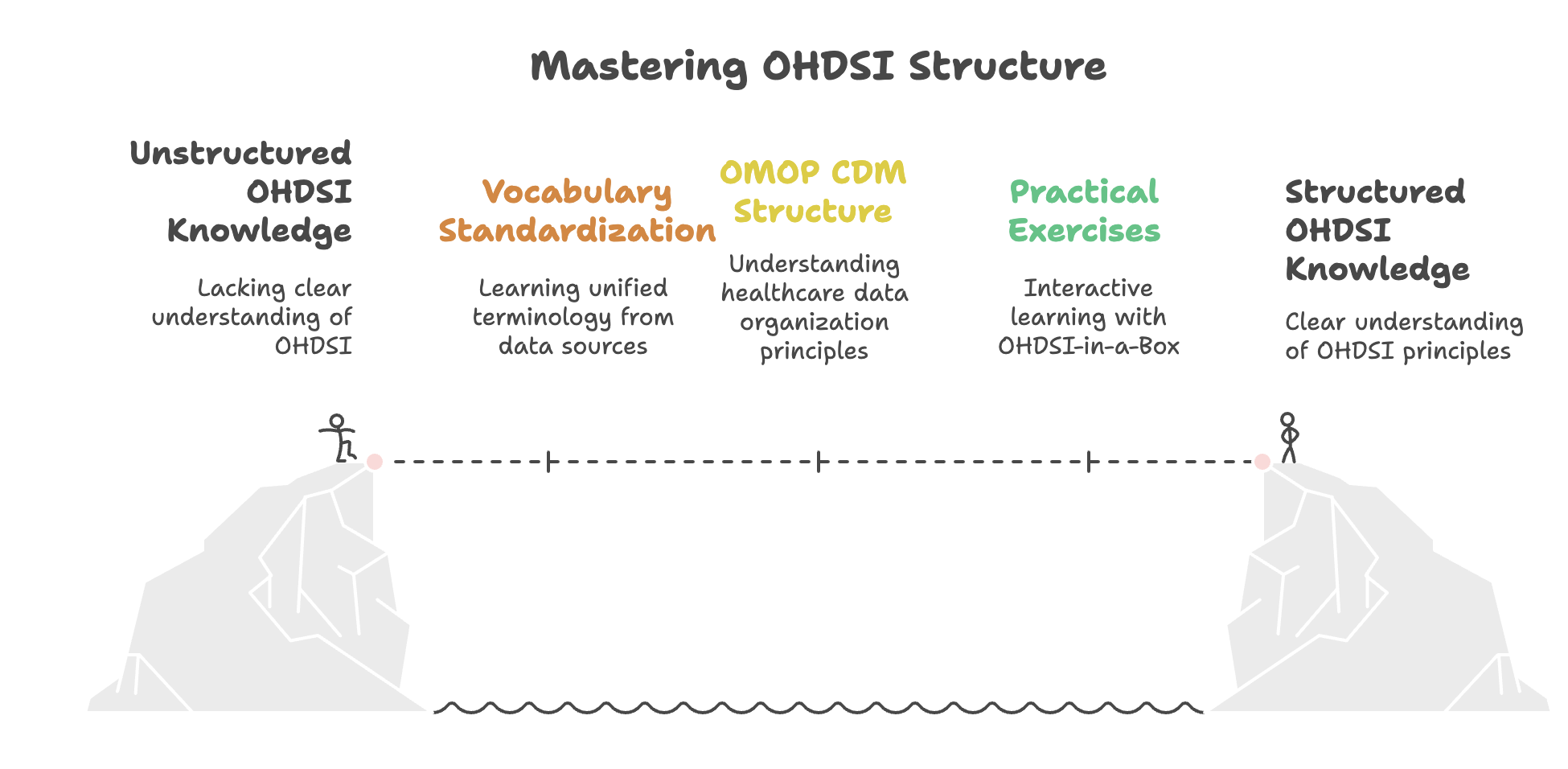
This course introduces you to the origins of OMOP, how OHDSI evolved from it, and what the network is trying to achieve in real-world research.
- Starts with the history and mission of OHDSI
- Teaches how OMOP vocabularies work
- Introducing the CDM structure
It also includes exercises where you can interact with the OMOP CDM.
## Learn by Doing: Extract, Transform, and Load (ETL)
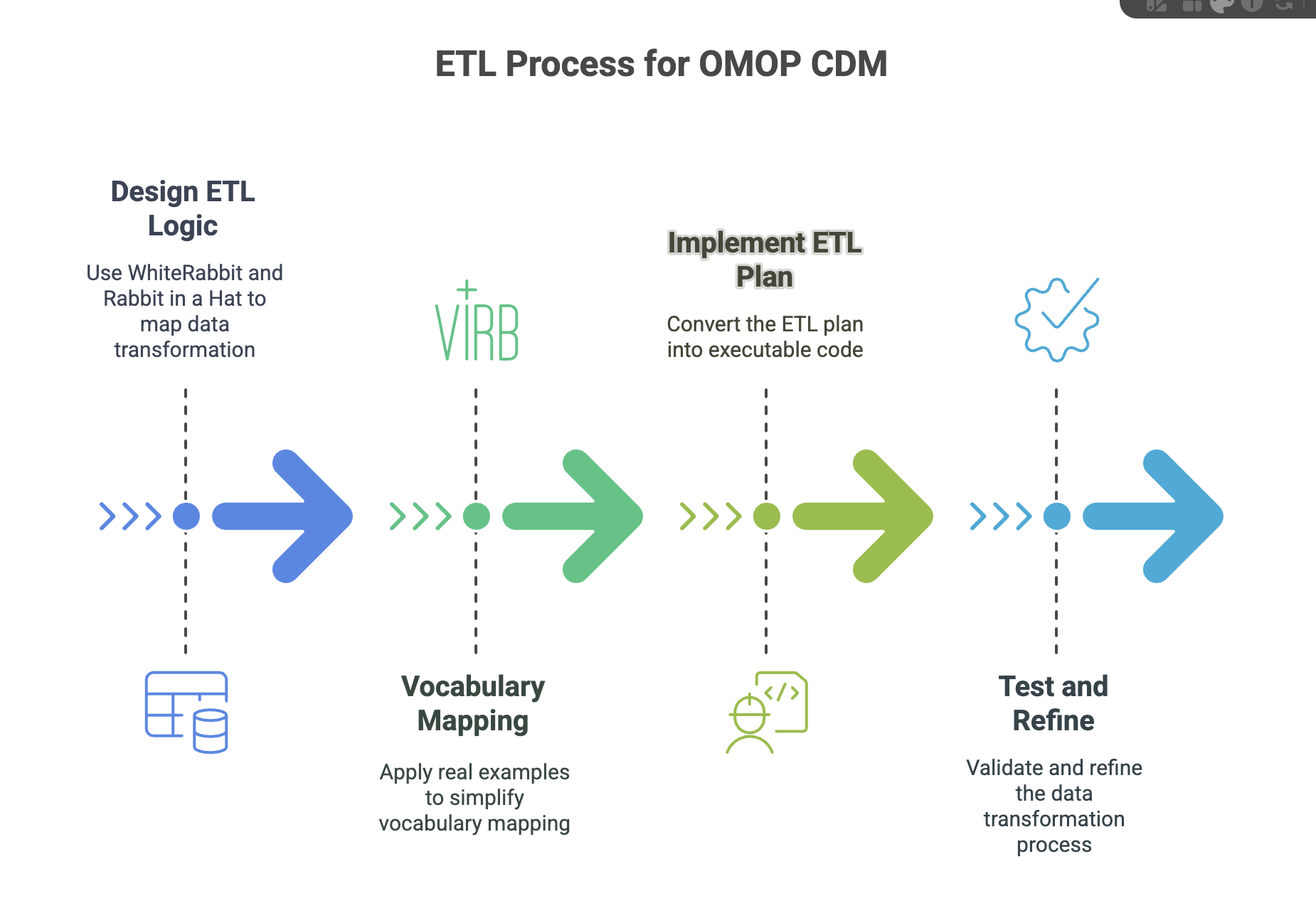
This course connects everything — vocabularies, structure, tools — into a process that prepares data for research. Here's what you learn:
**Step 1 & 2: Designing Your ETL Logic**
- Use WhiteRabbit and Rabbit in a Hat to visually map your data to the OMOP CDM tables
- Practice mapping vocabulary with real examples
**Step 3 & 4: Implementation and Testing**
- Learn how to turn the plan into working code
- Understand how to test and refine your ETL logic
## Usagi and Code Mapping
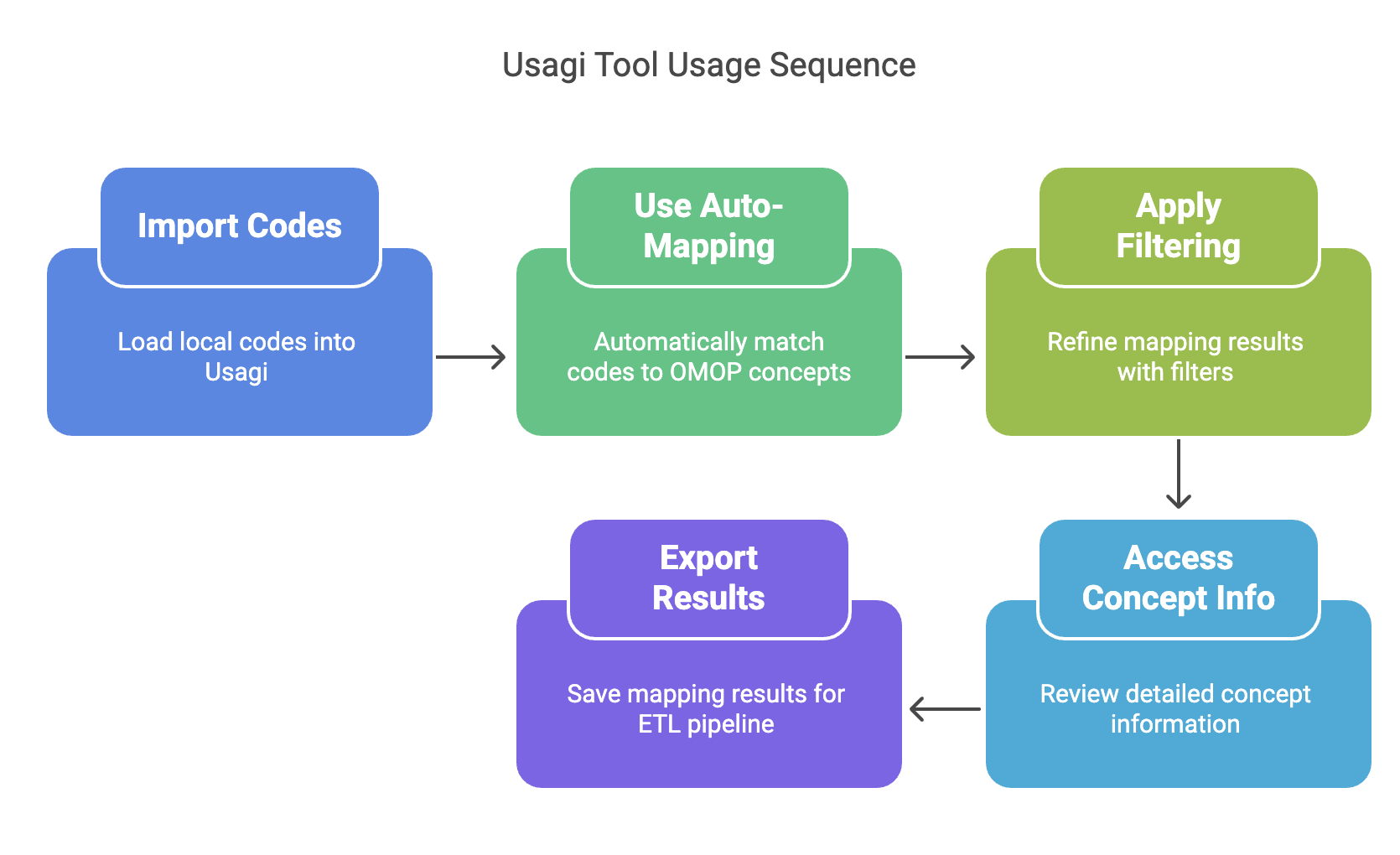
Usagi is a powerful tool for vocabulary mapping — one of the trickiest parts of ETL. In this course, you'll learn to:
- Import local codes into Usagi
- Use filters, auto-mapping, and concept info features
- Export mappings for direct use in your ETL
You'll also explore advanced options like mapping types and concept hierarchies.
## Learn Along the Way
While working through EHDEN, keep these resources by your side:
**[The Book of OHDSI](https://ohdsi.github.io/TheBookOfOhdsi/)** contains a detailed guide to anything in OHDSI.
The **[OHDSI YouTube Channel](https://www.youtube.com/@OHDSI/featured)** has recordings of helpful tutorials for tools, past meetings or symposium presentations.
Some of our favorites:
- [10-minute Athena Demo](https://www.youtube.com/watch?v=2WdwBASZYLk)
- [ETL Tutorial](https://www.youtube.com/watch?v=4vytGDrhHpk)
The **[OHDSI GitHub](https://github.com/OHDSI)** stores code and documentation for hundreds of tools developed by the OHDSI community.
## Connect: OHDSI Working Groups and Community
Once you’re comfortable, get involved in OHDSI’s working groups. It’s a great way to learn and collaborate. Follow these steps:
- [Request OHDSI Teams access](https://forms.office.com/Pages/ResponsePage.aspx?id=lAAPoyCRq0q6TOVQkCOy1ZyG6Ud_r2tKuS0HcGnqiQZUQ05MOU9BSzEwOThZVjNQVVFGTDNZRENONiQlQCN0PWcu)
- [Explore all working groups](https://ohdsi.org/workgroups-2023/) and decide which ones you're interested in.
- [Sign up for Working Groups](https://forms.office.com/Pages/ResponsePage.aspx?id=lAAPoyCRq0q6TOVQkCOy1ZyG6Ud_r2tKuS0HcGnqiQZUOVJFUzBFWE1aSVlLN0ozR01MUVQ4T0RGNyQlQCN0PWcu)
- [Check the meeting calendar](https://ohdsi.org/upcoming-working-group-calls/) and start joining the meetings.
We joined groups like Common Data Model, Phenotype Development, and Oncology — and found it extremely insightful.
To get up to date, you can watch recordings of the most recent meetings from the groups you're interested in. You can find them on the Teams channels.
## Ready for a Challenge? Try Synthea
If you're feeling brave, you might want to go for a hands-on small project. Try running an ETL with synthetic patient data.
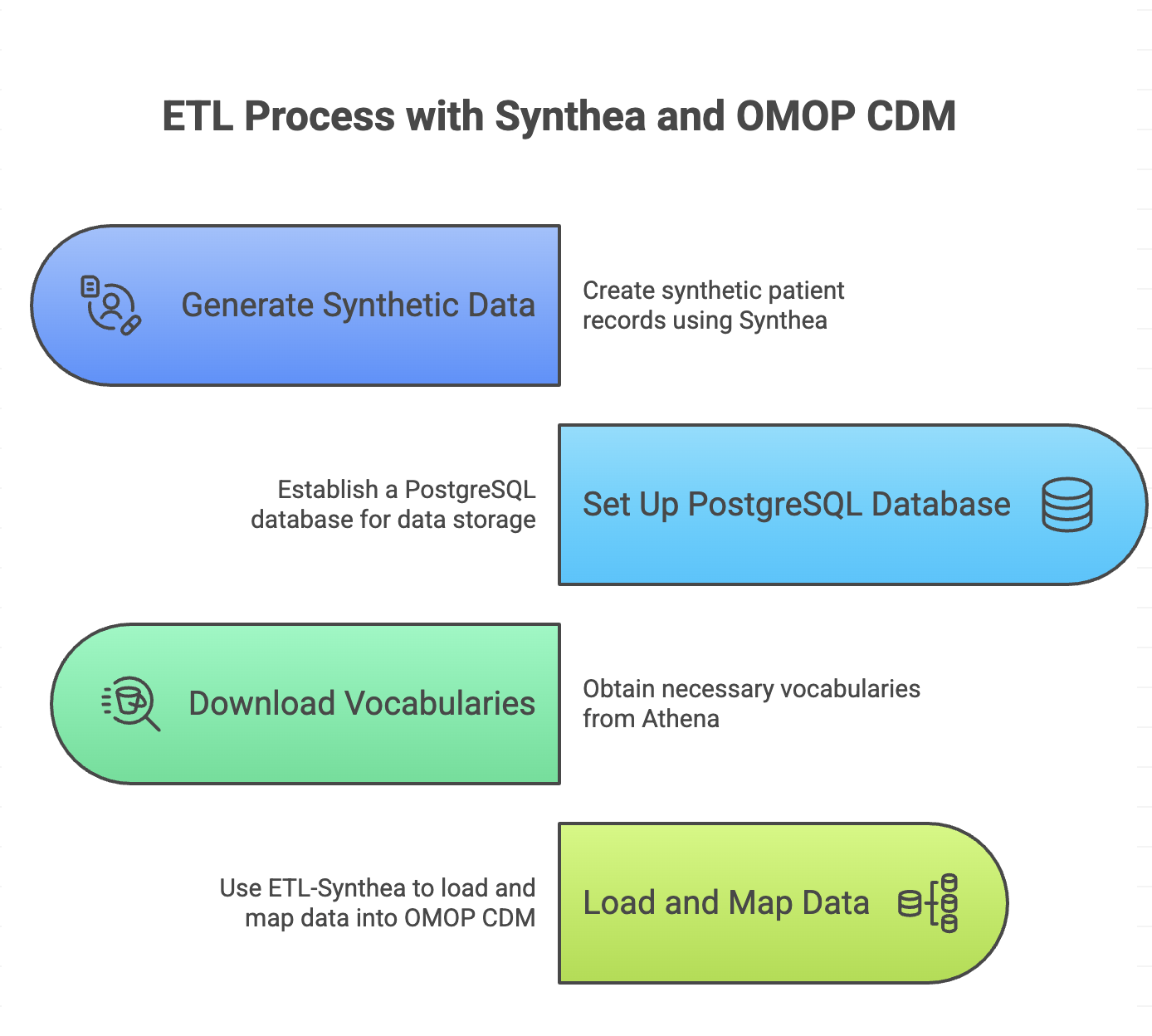
Here's a few hints on how to do it:
1. Generate synthetic data using [Synthea](https://github.com/synthetichealth/synthea)
2. Set up a PostgreSQL database
3. Download vocabularies from [Athena](https://athena.ohdsi.org/search-terms/start)
4. Use the [ETL-Synthea R package](https://github.com/OHDSI/ETL-Synthea) to do everything. This package will
- Load your synthetic data to the PostgreSQL database
- Load the vocabularies you downloaded to the PostgreSQL database
- Map your synthetic data into OMOP CDM and load it to the PostgreSQL database
## A bit of encouragement
The OHDSI journey doesn’t need to be overwhelming. Take it one step at a time. Use the EHDEN Academy, ask questions, try tools, and most importantly, connect with others. You're not alone in this. And with every new learner who shares what helped them, the path gets a little clearer for the next.
## Give us feedback
Please, let us know if there's anything you're missing in this post and you found helpful.